
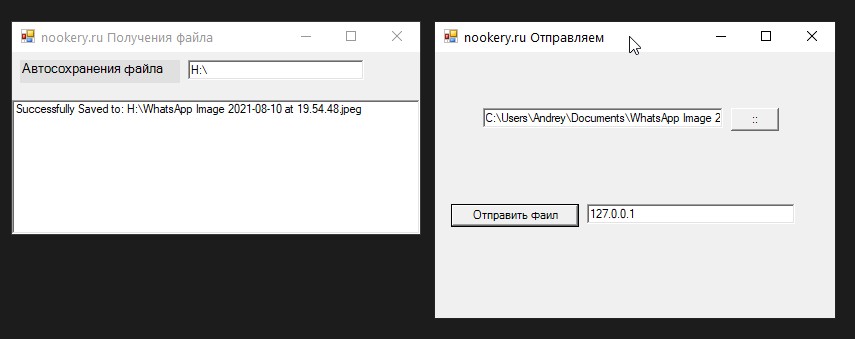
Вы этой статье я покажу как можно создать клиентско серверное приложение для передачи файлов по сети.
Для начала напишем проект для передачи файла:
using System;
using System.Drawing;
using System.Collections;
using System.ComponentModel;
using System.Windows.Forms;
using System.Data;
using System.Runtime.Serialization.Formatters.Binary;
using System.IO;
using System.Net;
using System.Net.Sockets;

namespace File_Sender
{
	/// <summary>
	/// Summary description for Form1.
	/// </summary>
	public class Form1 : System.Windows.Forms.Form
	{
		private System.Windows.Forms.TextBox textBox1;
		private System.Windows.Forms.Button button1;
		private System.Windows.Forms.Button button2;
		private System.Windows.Forms.TextBox text_IP;
		private System.Windows.Forms.OpenFileDialog openFileDialog1;
		/// <summary>
		/// Required designer variable.
		/// </summary>
		private System.ComponentModel.Container components = null;

		public Form1()
		{
			//
			// Required for Windows Form Designer support
			//
			InitializeComponent();

			//
			// TODO: Add any constructor code after InitializeComponent call
			//
		}

		/// <summary>
		/// Clean up any resources being used.
		/// </summary>
		protected override void Dispose( bool disposing )
		{
			if( disposing )
			{
				if (components != null)
				{
					components.Dispose();
				}
			}
			base.Dispose( disposing );
		}

		#region Windows Form Designer generated code
		/// <summary>
		/// Required method for Designer support - do not modify
		/// the contents of this method with the code editor.
		/// </summary>
		private void InitializeComponent()
		{
			this.textBox1 = new System.Windows.Forms.TextBox();
			this.button1 = new System.Windows.Forms.Button();
			this.button2 = new System.Windows.Forms.Button();
			this.text_IP = new System.Windows.Forms.TextBox();
			this.openFileDialog1 = new System.Windows.Forms.OpenFileDialog();
			this.SuspendLayout();
			//
			// textBox1
			//
			this.textBox1.Location = new System.Drawing.Point(48, 56);
			this.textBox1.Name = "textBox1";
			this.textBox1.Size = new System.Drawing.Size(240, 20);
			this.textBox1.TabIndex = 0;
			this.textBox1.Text = "";
			this.textBox1.TextChanged += new System.EventHandler(this.textBox1_TextChanged);
			//
			// button1
			//
			this.button1.Location = new System.Drawing.Point(296, 56);
			this.button1.Name = "button1";
			this.button1.Size = new System.Drawing.Size(48, 23);
			this.button1.TabIndex = 1;
			this.button1.Text = "::";
			this.button1.Click += new System.EventHandler(this.button1_Click);
			//
			// button2
			//
			this.button2.Enabled = false;
			this.button2.Location = new System.Drawing.Point(16, 152);
			this.button2.Name = "button2";
			this.button2.Size = new System.Drawing.Size(128, 23);
			this.button2.TabIndex = 2;
			this.button2.Text = "Send The File To:";
			this.button2.Click += new System.EventHandler(this.button2_Click);
			//
			// text_IP
			//
			this.text_IP.Location = new System.Drawing.Point(152, 152);
			this.text_IP.Name = "text_IP";
			this.text_IP.Size = new System.Drawing.Size(208, 20);
			this.text_IP.TabIndex = 3;
			this.text_IP.Text = "127.0.0.1";
			//
			// Form1
			//
			this.AutoScaleBaseSize = new System.Drawing.Size(5, 13);
			this.ClientSize = new System.Drawing.Size(400, 266);
			this.Controls.Add(this.text_IP);
			this.Controls.Add(this.button2);
			this.Controls.Add(this.button1);
			this.Controls.Add(this.textBox1);
			this.Name = "Form1";
			this.StartPosition = System.Windows.Forms.FormStartPosition.CenterScreen;
			this.Text = "File Sender - By Fadi Abdel-qader fadidotnet.org";
			this.ResumeLayout(false);

		}
		#endregion

		/// <summary>
		/// The main entry point for the application.
		/// </summary>
		[STAThread]
		static void Main()
		{
			Application.Run(new Form1());
		}

		private void button2_Click(object sender, System.EventArgs e)
		{


			FileStream fs = new FileStream(textBox1.Text,FileMode.Open);
			byte[] buffer = new byte[fs.Length];
			int len = (int)fs.Length;
			fs.Read(buffer,0,len);
			fs.Close();


			BinaryFormatter br = new BinaryFormatter ();
			TcpClient myclient = new TcpClient (text_IP.Text,7000);
			NetworkStream myns = myclient.GetStream ();
			br.Serialize (myns,FileName);

			BinaryWriter  mysw = new BinaryWriter (myns);
			mysw.Write(buffer);
			mysw.Close ();

			myns.Close ();
			myclient.Close ();
		}

		string FileName;
		private void button1_Click(object sender, System.EventArgs e)
		{

			openFileDialog1.ShowDialog();
			textBox1.Text = openFileDialog1.FileName;

			FileInfo TheFile = new FileInfo(textBox1.Text); // Get The File Name
			FileName  = TheFile.Name;

		}

		private void textBox1_TextChanged(object sender, System.EventArgs e)
		{
			if (textBox1.Text.Length > 3) button2.Enabled = true; else button2.Enabled = false;

		}
	}
}
Теперь создадим проект для приема данный:
using System;
using System.Drawing;
using System.Collections;
using System.ComponentModel;
using System.Windows.Forms;
using System.Data;
using System.Threading;
using System.Runtime.Serialization.Formatters.Binary;
using System.Runtime.Serialization.Formatters;
using System.IO;
using System.Net;
using System.Net.Sockets;

namespace File_Receiver
{
	/// <summary>
	/// Summary description for Form1.
	/// </summary>
	public class Form1 : System.Windows.Forms.Form
	{
		private System.Windows.Forms.Label label1;
		private System.Windows.Forms.TextBox textBox1;
		private System.Windows.Forms.ListBox listBox1;
		/// <summary>
		/// Required designer variable.
		/// </summary>
		private System.ComponentModel.Container components = null;

		public Form1()
		{
			//
			// Required for Windows Form Designer support
			//
			InitializeComponent();

			//
			// TODO: Add any constructor code after InitializeComponent call
			//
		}

		/// <summary>
		/// Clean up any resources being used.
		/// </summary>
		protected override void Dispose( bool disposing )
		{
			if( disposing )
			{
				if (components != null)
				{
					components.Dispose();
				}
			}
			base.Dispose( disposing );
		}

		#region Windows Form Designer generated code
		/// <summary>
		/// Required method for Designer support - do not modify
		/// the contents of this method with the code editor.
		/// </summary>
		private void InitializeComponent()
		{
			this.label1 = new System.Windows.Forms.Label();
			this.textBox1 = new System.Windows.Forms.TextBox();
			this.listBox1 = new System.Windows.Forms.ListBox();
			this.SuspendLayout();
			//
			// label1
			//
			this.label1.BackColor = System.Drawing.Color.FromArgb(((System.Byte)(224)), ((System.Byte)(224)), ((System.Byte)(224)));
			this.label1.Font = new System.Drawing.Font("Microsoft Sans Serif", 9.75F, System.Drawing.FontStyle.Regular, System.Drawing.GraphicsUnit.Point, ((System.Byte)(178)));
			this.label1.Location = new System.Drawing.Point(8, 8);
			this.label1.Name = "label1";
			this.label1.Size = new System.Drawing.Size(160, 23);
			this.label1.TabIndex = 0;
			this.label1.Text = "Automatically Save to";
			//
			// textBox1
			//
			this.textBox1.Location = new System.Drawing.Point(176, 8);
			this.textBox1.Name = "textBox1";
			this.textBox1.Size = new System.Drawing.Size(176, 20);
			this.textBox1.TabIndex = 1;
			this.textBox1.Text = "C:\\";
			//
			// listBox1
			//
			this.listBox1.Dock = System.Windows.Forms.DockStyle.Bottom;
			this.listBox1.Location = new System.Drawing.Point(0, 48);
			this.listBox1.Name = "listBox1";
			this.listBox1.Size = new System.Drawing.Size(408, 134);
			this.listBox1.TabIndex = 2;
			//
			// Form1
			//
			this.AutoScaleBaseSize = new System.Drawing.Size(5, 13);
			this.ClientSize = new System.Drawing.Size(408, 182);
			this.Controls.Add(this.listBox1);
			this.Controls.Add(this.textBox1);
			this.Controls.Add(this.label1);
			this.Name = "Form1";
			this.StartPosition = System.Windows.Forms.FormStartPosition.CenterScreen;
			this.Text = "File Receiver  By Fadi Abdel-qader fadidotnet.org";
			this.Closing += new System.ComponentModel.CancelEventHandler(this.Form1_Closing);
			this.Load += new System.EventHandler(this.Form1_Load);
			this.ResumeLayout(false);

		}
		#endregion

		/// <summary>
		/// The main entry point for the application.
		/// </summary>
		[STAThread]
		static void Main()
		{
			Application.Run(new Form1());
		}


		NetworkStream myns;
		TcpListener mytcpl;
		Socket mysocket;
		Thread myth;
		BinaryReader bb;

		void File_Receiver()
		{
			mytcpl = new TcpListener (7000);
			mytcpl.Start ();
			mysocket = mytcpl.AcceptSocket ();
			myns = new NetworkStream (mysocket);
			BinaryFormatter br = new BinaryFormatter ();
			object op;

			op= br.Deserialize (myns); // Deserialize the Object from Stream


			bb = new BinaryReader (myns);
			byte[] buffer = bb.ReadBytes(5000000);

			FileStream fss = new FileStream(@textBox1.Text + (string) op, FileMode.CreateNew, FileAccess.Write);
			fss.Write(buffer,0,buffer.Length);
			fss.Close();
			mytcpl.Stop();
			listBox1.Items.Add ("Successfully Saved to: " + textBox1.Text + (string) op);

			if (mysocket.Connected ==true)
			{
				while (true)
				{
					File_Receiver();
				}
			}
		}
		private void Form1_Load(object sender, System.EventArgs e)
		{
			myth= new Thread  (new System.Threading .ThreadStart(File_Receiver)); // Start Thread Session
			myth.Start ();
		}

		private void Form1_Closing(object sender, System.ComponentModel.CancelEventArgs e)
		{
			myth.Abort ();
			mytcpl.Stop ();
		}
	}
}
N
Как это работает:
- Сервер запускается и начинает слушать порт
5000. - Клиент подключается к серверу и отправляет файл
send_file.txt. - Сервер сохраняет файл как
received_file.txt.
Советы по улучшению:
- Добавьте протокол: имя файла, размер, подтверждения.
- Используйте
async/awaitдля асинхронной передачи. - Добавьте многопоточность для обработки нескольких клиентов.
- Реализуйте авторизацию и шифрование при передаче.
Вывод
Это базовый пример клиент-серверного взаимодействия для передачи файлов в .NET. Он легко расширяется и может служить фундаментом для создания более сложных систем обмена файлами и сетевых приложений.
Здравствуйте, у меня есть пара вопросов по отправке файла на другие компьютеры, как я могу связаться с вами, чтоб задать их?