
Криптография — важнейший инструмент в защите данных. В C# платформа .NET предоставляет мощные средства для шифрования, подписей и проверки целостности данных.
В данном примере мы создадим цифровую подпись с помощью алгоритма RSA, а затем проверим её — то есть сверим, соответствует ли подпись исходному сообщению.
Что мы реализуем:
Проверку подписи по открытому ключу.
Генерацию ключей RSA;
Подписание сообщения;
using System;
using System.Security.Cryptography;
using System.Text;

public class MD5HashHelper
{

	public byte[] GetHash(string message)
	{
		byte[] data;
		data = UTF8Encoding.ASCII.GetBytes(message);
		MD5CryptoServiceProvider md5 = new MD5CryptoServiceProvider();
		return md5.ComputeHash(data, 0, data.Length);
	}

	public bool VerifyHash(string message, byte[] hash)
	{
		byte[] data;
		data = UTF8Encoding.ASCII.GetBytes(message);
		MD5CryptoServiceProvider md5 = new MD5CryptoServiceProvider();
		byte[] hashTemp = md5.ComputeHash(data, 0, data.Length);

		for (Int32 counter = 0; counter <= hash.Length - 1; counter += 1)
		{
			if (hash[counter] != hashTemp[counter])
			{
				return false;
			}
		}
		return true;
	}
}

public class DigitalSignatureHelper
{
	private RSAParameters m_public;

	public byte[] CreateSignature(byte[] hash)
	{
		RSACryptoServiceProvider RSA = new RSACryptoServiceProvider();
		RSAPKCS1SignatureFormatter RSAFormatter = new RSAPKCS1SignatureFormatter(RSA);
		RSAFormatter.SetHashAlgorithm("MD5");
		m_public = RSA.ExportParameters(false);
		return RSAFormatter.CreateSignature(hash);
	}

	public bool VerifySignature(byte[] hash, byte[] signedhash)
	{
		RSACryptoServiceProvider RSA = new RSACryptoServiceProvider();
		RSAParameters RSAKeyInfo = new RSAParameters();
		RSAKeyInfo.Modulus = m_public.Modulus;
		RSAKeyInfo.Exponent = m_public.Exponent;
		RSA.ImportParameters(RSAKeyInfo);
		RSAPKCS1SignatureDeformatter RSADeformatter = new RSAPKCS1SignatureDeformatter(RSA);
		RSADeformatter.SetHashAlgorithm("MD5");
		return RSADeformatter.VerifySignature(hash, signedhash);
	}
}
И код формы:
using System;
using System.Drawing;
using System.Collections;
using System.ComponentModel;
using System.Windows.Forms;
using System.Data;

namespace DigitalSignature_Example
{
	/// <summary>
	/// Summary description for Form1.
	/// </summary>
	public class Form1 : System.Windows.Forms.Form
	{
		internal System.Windows.Forms.Button Button2;
		internal System.Windows.Forms.Button Button1;
		private System.Windows.Forms.TextBox textBox1;
		private System.Windows.Forms.TextBox textBox2;
		private System.Windows.Forms.Label label1;
		private System.Windows.Forms.Label label2;
		/// <summary>
		/// Required designer variable.
		/// </summary>
		private System.ComponentModel.Container components = null;

		public Form1()
		{
			//
			// Required for Windows Form Designer support
			//
			InitializeComponent();

			//
			// TODO: Add any constructor code after InitializeComponent call
			//
		}

		/// <summary>
		/// Clean up any resources being used.
		/// </summary>
		protected override void Dispose( bool disposing )
		{
			if( disposing )
			{
				if (components != null)
				{
					components.Dispose();
				}
			}
			base.Dispose( disposing );
		}

		#region Windows Form Designer generated code
		/// <summary>
		/// Required method for Designer support - do not modify
		/// the contents of this method with the code editor.
		/// </summary>
		private void InitializeComponent()
		{
			this.Button2 = new System.Windows.Forms.Button();
			this.Button1 = new System.Windows.Forms.Button();
			this.textBox1 = new System.Windows.Forms.TextBox();
			this.textBox2 = new System.Windows.Forms.TextBox();
			this.label1 = new System.Windows.Forms.Label();
			this.label2 = new System.Windows.Forms.Label();
			this.SuspendLayout();
			//
			// Button2
			//
			this.Button2.Location = new System.Drawing.Point(224, 24);
			this.Button2.Name = "Button2";
			this.Button2.Size = new System.Drawing.Size(112, 23);
			this.Button2.TabIndex = 5;
			this.Button2.Text = "Generate Signature";
			this.Button2.Click += new System.EventHandler(this.Button2_Click);
			//
			// Button1
			//
			this.Button1.Location = new System.Drawing.Point(224, 64);
			this.Button1.Name = "Button1";
			this.Button1.Size = new System.Drawing.Size(112, 23);
			this.Button1.TabIndex = 4;
			this.Button1.Text = "Verify Signature";
			this.Button1.Click += new System.EventHandler(this.Button1_Click);
			//
			// textBox1
			//
			this.textBox1.Location = new System.Drawing.Point(120, 24);
			this.textBox1.Name = "textBox1";
			this.textBox1.Size = new System.Drawing.Size(96, 20);
			this.textBox1.TabIndex = 6;
			this.textBox1.Text = "My Signature";
			//
			// textBox2
			//
			this.textBox2.Location = new System.Drawing.Point(120, 64);
			this.textBox2.Name = "textBox2";
			this.textBox2.Size = new System.Drawing.Size(96, 20);
			this.textBox2.TabIndex = 7;
			this.textBox2.Text = "My Signature";
			//
			// label1
			//
			this.label1.Font = new System.Drawing.Font("Microsoft Sans Serif", 8.25F, System.Drawing.FontStyle.Bold, System.Drawing.GraphicsUnit.Point, ((System.Byte)(178)));
			this.label1.Location = new System.Drawing.Point(8, 24);
			this.label1.Name = "label1";
			this.label1.TabIndex = 8;
			this.label1.Text = "Set Signature";
			//
			// label2
			//
			this.label2.Font = new System.Drawing.Font("Microsoft Sans Serif", 8.25F, System.Drawing.FontStyle.Bold, System.Drawing.GraphicsUnit.Point, ((System.Byte)(178)));
			this.label2.Location = new System.Drawing.Point(8, 64);
			this.label2.Name = "label2";
			this.label2.TabIndex = 9;
			this.label2.Text = "Verify Signature";
			//
			// Form1
			//
			this.AutoScaleBaseSize = new System.Drawing.Size(5, 13);
			this.ClientSize = new System.Drawing.Size(344, 110);
			this.Controls.Add(this.label2);
			this.Controls.Add(this.label1);
			this.Controls.Add(this.textBox2);
			this.Controls.Add(this.textBox1);
			this.Controls.Add(this.Button2);
			this.Controls.Add(this.Button1);
			this.MaximizeBox = false;
			this.Name = "Form1";
			this.StartPosition = System.Windows.Forms.FormStartPosition.CenterScreen;
			this.Text = "Digital Signature - By Fadi Abdel-qader";
			this.ResumeLayout(false);

		}
		#endregion

		/// <summary>
		/// The main entry point for the application.
		/// </summary>
		[STAThread]
		static void Main()
		{
			Application.Run(new Form1());
		}

		DigitalSignatureHelper ds = new DigitalSignatureHelper();
		byte[] hash1;
		byte[] hash2;
		byte[] signedhash;

		private void Button2_Click(object sender, System.EventArgs e)
		{
			try
			{
				MD5HashHelper md5 = new MD5HashHelper();
				hash1 = md5.GetHash(textBox1.Text);
				signedhash = ds.CreateSignature(hash1);
				MessageBox.Show("Подпись создана успешно!");
			}
			catch(Exception ex){MessageBox.Show(ex.Message);}
			}

		private void Button1_Click(object sender, System.EventArgs e)
		{
			try
			{
				MD5HashHelper md5 = new MD5HashHelper();
				hash2 = md5.GetHash(textBox2.Text);

				if (ds.VerifySignature(hash2, signedhash))
				{
					MessageBox.Show("Подписи проверены Успешно!");
				}
				else
				{
					MessageBox.Show("Не удалось проверить подписи!");
				}
			}
			catch(Exception ex){MessageBox.Show(ex.Message);}
		}
	}
}
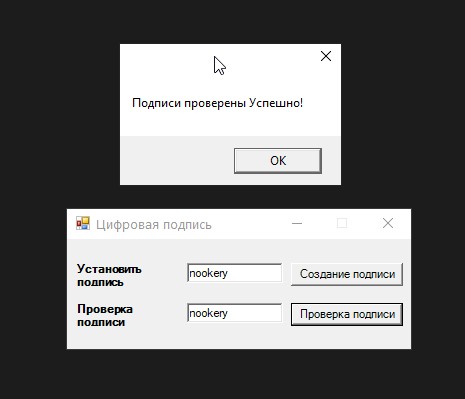
Что здесь происходит:
- Сначала мы генерируем пару ключей RSA (открытый + закрытый).
- Закрытым ключом создается цифровая подпись сообщения.
- Затем проверяем подпись, используя открытый ключ.
- Если данные подменены — проверка не пройдет.
⚠️ Обратите внимание:
- Используется
SHA256— современный и безопасный хеш-алгоритм. RSACryptoServiceProviderможно заменить наRSA.Create()в .NET Core.- Ключи можно сохранять в файлы или использовать в
X509Certificate2.
Вывод
Пример показывает, как легко в C# реализовать базовую защиту данных с помощью цифровой подписи. Это может использоваться в системах обмена сообщениями, лицензировании, документообороте и других сценариях, где важна подлинность и целостность данных.